
BenQ InstaShow WDC15 4K UHD Wireless Presentation System
SKU: WDC15
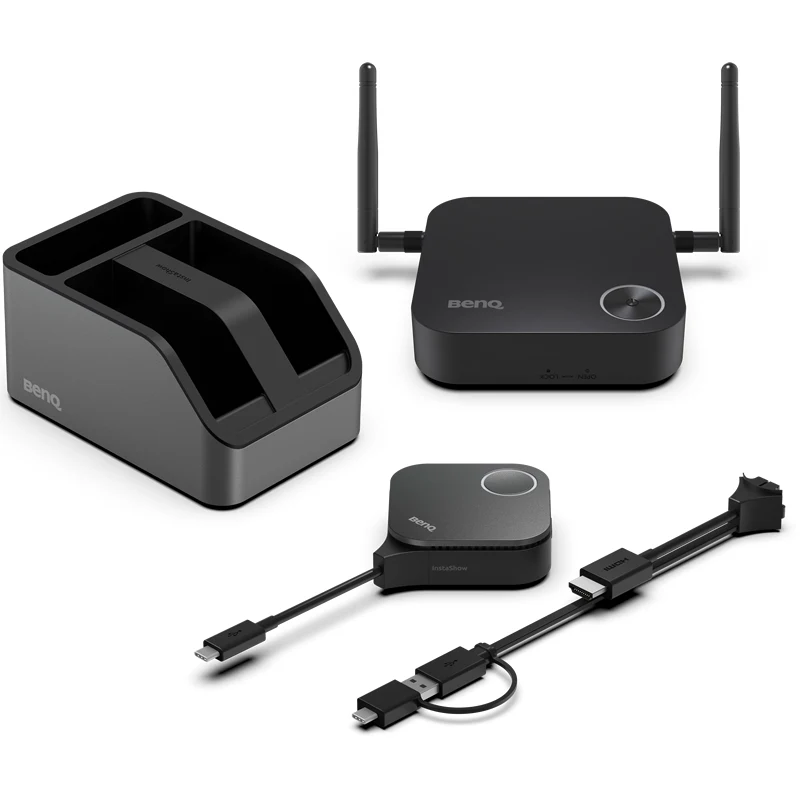



Driver-Free Screen Mirroring for Huddle & Small Rooms
The BenQ InstaShow WDC15 is the ultimate "zero-friction" wireless presentation solution for modern meeting rooms, designed to eliminate the frustration of cables, apps, and IT support. This hardware-based system offers true plug-and-play simplicity—just connect the Button to your laptop via HDMI or USB-C and tap to start sharing in stunning 4K UHD resolution. Because it requires no software drivers or network logins, it is exceptionally guest-friendly and bypasses the security risks and lag often associated with app-based screen mirroring. With enterprise-grade WPA3 encryption and CVSS 4.0 certification, the WDC15 ensures your data stays private while delivering a lag-free, professional experience for up to 16 simultaneous presenters.
Features
- No Setup: no apps, drivers, or network required
- Guest-Friendly: share without login hassle
- Zero Latency: smooth 4K/30fps video playback
- Secure Connection: CVSS 4.0 certified encryption
- Hassle-Free Maintenance: swappable plugs


No App Download Required
No software or app required—just plug in and instantly share content during your meeting.

No Driver Needed
No drivers needed—just plug in and share your screen instantly during meetings. *Supports Windows, macOS, Linux, or ChromeOS systems.

No Network Setup Required
No complex network setup or IT help needed. Receiver and button pair automatically—just plug and play to start presenting instantly.
Guest-Friendly Design
Guests can present instantly via HDMI or USB-C—no app or login required. Securely share from any laptop, including MacBook and Chromebook, keeping meetings on track.

Steps for One-Time Wireless Presentation Setup
Set up once—no need to rebuild for every meeting. Save time, cut support, and let presenters start instantly by plugging in.
Steps:- Connect display to Receiver via HDMI cable
- Plug Button into presenter's laptop
*Supports Windows, MacBook, or Chromebook systems. - Share content from presenter's laptop via Button
Seamless 4K UHD Transmission
Enjoy smooth 4K UHD transmission with full support for 4K, HDCP, and Touchback control—delivering professional, interactive presentations every time.

Crisp 4K Transmission Without Lag
Showcase 4K content smoothly, with no distortion or stutter, delivering powerful visuals that convince decision-makers.

Direct Touch Control on Display
Control content right from the interactive display—no interruptions, just smooth and natural interaction.

Smooth Streaming of Protected Content
App-free design boosts PC performance, ensuring smooth, lag-free HDCP content playback for seamless presentations.
Superior Encryption Security
Advanced encryption ensures secure wireless transmission, protecting your data and privacy during presentations.
Zero Software or Network Setup
No software or internet needed, minimizing risks and keeping sensitive data safe from breaches and hacks.

WPA3 Security Protection
WPA3 encryption secures the receiver-button connection, keeping every presentation safe, secure, and reliable.

HDCP Support
Supports HDCP-encrypted HDMI content, letting presenters connect devices without security errors or blank screens.

CVSS 4.0 Certified Security
Certified to CVSS 4.0 by ISO27001 & ISO17025 labs for guaranteed information security.
Hassle-Free Maintenance
Swappable plugs make maintenance easy — replace lost or damaged buttons without needing IT support making it perfect for busy meeting rooms.

Versatile Connection Design
Quickly switch between HDMI and Type-C for easy maintenance and seamless device use. *Uses the Phillips #0 screwdriver to loosen, remove and replace the plug.
| InstaShow Package | |
|---|---|
| Antenna | (x2), 2dbi, MIMO |
| Button (Transmitter) | (x1) |
| Cradle | (x1) |
| HDMI cable | (x1) |
| Host (Receiver) | (x1) |
| Power Adapter | (x1) |
| Safety Statement | (x1) |
| InstaShow Button | |
| Button Connector Type | USB Type C |
| Button Function Key | Mode Key |
| InstaShow Host | |
| Host Power Supply | 2A, DC 5V±10% |
| Host Normal Power Consumption | 10W |
| LAN (RJ45) | (x1) |
| HDMI out | (x1) |
| Host Dimensions without antenna | 110x110x29 mm |
| Host Weight | 205 g |
| InstaShow Cradle | |
| Cradle Dimensions | 84.5x62.5x128mm |
| Cradle Weight | 568 g |
| InstaShow Features | |
| Advanced Encryption Standard | AES128 |
| Maximum Output Resolution (Receiver) | Up to 4K 30Hz |
| Simultaneous connections | 16 |
| Video Outputs | HDMI 1.4 (with HDCP) |
| WiFi Protected Access | WPA3 |
| WiFi Standard | 5 |
| Wireless Data Rate (Maximum) | AC1200 (5G 867 Mbps) |
| Wireless Frequency | 5G |